 AnonymFiles
Need to share a document, but not your identity?
Redact a PDF in 1 minute, without uploading it anywhere.
An app for Mac and PC. Your PDF is anonymized on your computer, never sent to a server.
Coming soon to Mac and Windows. No account, no connection, ever.
Also coming soon: an MCP server to use it directly inside Claude, ChatGPT and your AI agents.
An app for Mac and PC. Send yourself the link and open it on your computer.
Case memo
Camille DurandPERSON 1 hired Atelier BoréalORGANIZATION 1 on March 15, 2026. The agreed amount is $12,000CONFIDENTIAL 1.
Ms. DurandPERSON 1 says the work is still unfinished.
Contact: camille.durand@example.testEMAIL 1 ; (555) 012-3456PHONE 1.
Found in this file
The app, in 30 seconds
From a confidential file to an AI-ready copy.
How does it work?
Three steps. The file doesn't move.
Drop in a folder
PDF, Word or text, subfolders included. Your originals are never modified.
Review
Original and copy side by side. One click to add or remove a redaction.
Export
Data removed from the file, metadata stripped, neutral file names.
"Local", really?
The only truly 100% offline tool.
Plenty of "local" anonymization software still goes online: to check your license, send usage statistics or run an AI chat in the cloud. AnonymFiles never does.
No license check
No account, no online activation, no monthly check-in. The app works without a network, indefinitely.
No telemetry
No usage statistics, no ping at startup, no file counter. Nothing leaves, not even anonymized.
No cloud chat
The app talks to no AI. You decide what to share, and with whom.
A whole folder
Every document in a case file, subfolders included, with the same labels from one file to the next.
Original / copy review
Side by side, document by document. Nothing is exported until you approve it.
AI agents only see the copies
Claude and MCP-compatible agents read the redacted copies, never the originals.
Turn off Wi-Fi before you open it: nothing changes.
What does it look like?
The app, screen by screen.
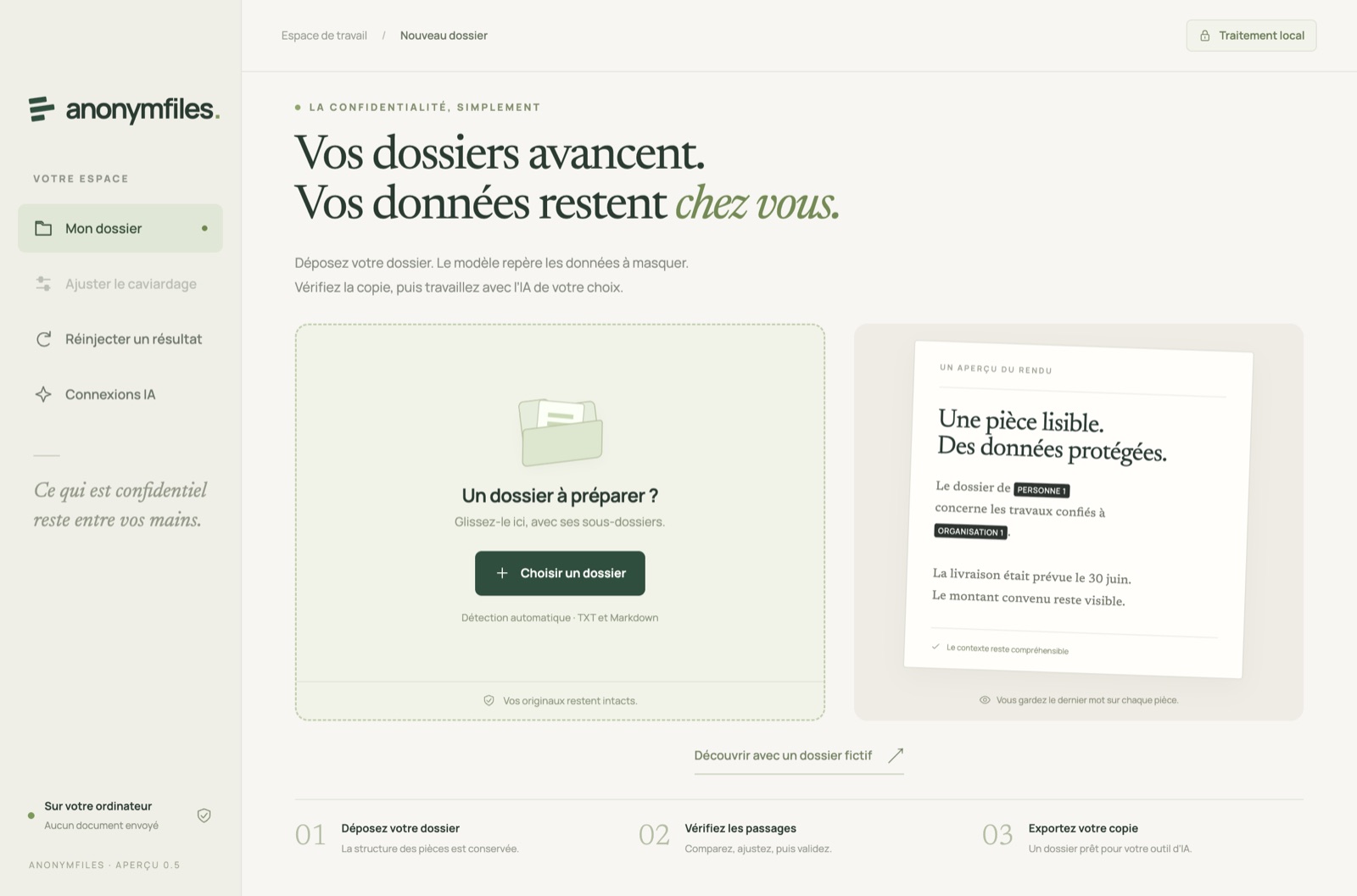
Drop a folderDrag in a whole folder, subfolders included. Originals stay untouched.
Coming soon. No account, no connection.
Why not an online tool?
With us, the file stays put. With them, it leaves first.
| AnonymFiles, on your computer | Online redaction tool | |
|---|---|---|
| Where the file is processed | On your machine | On a server, unencrypted |
| Account, identity | None | Sign-up, history tied to you |
| Works offline | Yes, fully | No |
| GDPR data processor | None for this processing | Art. 28 contract to manage |
| Page limits | None | Caps per file and per month |
| Hidden PDF data | Cleaned on export | Depends on the tool |
One minute to try it on a real document.
Drop in a PDF, turn off Wi-Fi: same result. Coming soon to Mac and Windows.
No account, no connection.
Isn't a black box enough?
Covering is not removing.
The text under the box
A box drawn over text only changes what you see. Copy and paste brings it all back.
The content under the redaction is removed from the file. Nothing to extract.
Black box. Hover or tap.
What the file still contains.
With AnonymFiles. A label.
Nothing behind it.
The invisible layers
Metadata, attachments, hidden layers, earlier versions: a PDF carries more than it shows.
Export cleans them out. On this hidden data: Adobe, How to redact a PDF.
Where it happens matters
Perfectly anonymizing a file that was already uploaded unencrypted is locking the door too late.
Everything happens here. Turn off Wi-Fi and nothing changes. The only guarantee you can check yourself.
Who's it for?
For people who can't afford a mistake.
Anonymize a ruling or a brief before sharing it or handing it to an AI, without the file ever leaving the firm.
Rulings, briefs, expert reports, discovery documents.
Share only the data that is strictly necessary, as GDPR requires.
Contracts, payslips, insurance claims, financial statements.
Remove the patient's identity from a medical report, on a machine that needs no network.
Medical reports, prescriptions, case files.
Send a rental or loan application without giving away your bank details or your address.
Payslips, tax returns, certificates, bank details.
How much does it cost?
One price per seat, per year. Never per page.
| What's included | RecommendedPro$290per year, per seatWhole folders, in batches. | Team$240per year and per seat, from 3 seatsSeveral seats, without losing a day to it. | EnterpriseCustom quotecontractual commitmentCommand line, OEM license. |
|---|---|---|---|
| Detection, redaction, original/copy review, metadata cleaning | Yes | Yes | Yes |
| Files at once | Unlimited, batch processing | Unlimited | Unlimited |
| Put the real names back into the AI's answer | Yes | Yes | Yes |
| Support | Email, 2 business days | Priority email, 1 day | Dedicated contact, contractual commitment |
| Command line | No | No | Yes |
| OEM license (engine inside third-party software) | — | — | Per-seat royalty, negotiable |
One app for every plan. Team or Enterprise? Ask for a quote.
- No online license check, ever.
- Updates included while your subscription runs.
- 30% off for nonprofits, education and legal aid.
One last question?
Frequently asked questions
How much does it cost?
Pro costs $290 per year per seat, Team $240 per year per seat from 3 seats. Enterprise on quote. See pricing.
Can redacted data be recovered?
No. Content under a redaction is removed from the exported file, hidden layers (metadata, annotations, form fields, links) are removed, and you review and approve every document before export.
Are my documents sent anywhere?
No. The app works without any connection: no account, no license check, no telemetry, no cloud chat.
What is the difference between redacting and anonymizing?
Redacting permanently removes an area. Anonymizing replaces data with stable labels ("Person 1") so the document stays readable. AnonymFiles does both.
Which files are supported?
PDFs that contain text, Word documents (.docx), text and Markdown files. Scanned PDFs, images and other formats are flagged and excluded from the export, never copied over as is. Reading scans is in preparation.
Which computers?
Macs with Apple silicon (M1 and later) and 64-bit Windows 10 or 11 PCs.
Who uses it already?
What users say
Used at
AnonymFiles launched in September 2026. The first reviews will be published here, with name and role, never without consent.
Preview with fake data. Do not publish.
Ready to try it?
The next document you share can stay on your desk.
Install, drop in a PDF, export. One minute.
Coming soon to Mac and Windows, no account. And soon an MCP server to use it directly inside Claude, ChatGPT and your AI agents. Get notified at launch